

At some stage in every company’s growth, “my nephew handles our office computers” stops working. A password gets reset by the wrong staff member, a company laptop is lost on public transit, a critical backup turns out to be empty, and suddenly IT shifts from a minor annoyance into an existential business risk.
This comprehensive guide compares the three standard pathways a small business takes to manage technology: a staff member who does IT on the side, a dedicated in-house employee, and an outside managed service provider (MSP). Rather than relying on vendor sales marketing claims, this analysis is grounded in published standards from the Cybersecurity and Infrastructure Security Agency (CISA), the Federal Trade Commission (FTC), and labor data from the U.S. Bureau of Labor Statistics (BLS).
At-a-Glance: How Small Businesses Should Structure IT Support
- 1. Map Responsibilities Before Hiring: Break IT into discrete disciplines: help desk, accounts & access, device lifecycle, patching, tested backups, and security governance. Decide who owns each area before choosing a model.
- 2. Universal Federal Security Baseline: Regardless of your model, CISA and the FTC enforce the same non-negotiable floor: hardware-backed Multi-Factor Authentication (MFA), prompt patching of Known Exploited Vulnerabilities (KEV), verified backup test restores, and removal of user admin rights.
- 3. Recognize the Structural Risks: A single in-house IT hire creates an acute single point of failure (vacations, departures, narrow skill range). An outside provider holds deep administrative keys to your kingdom and requires written security contracts and audits—not blind trust.
- 4. The Co-Managed Hybrid Sweet Spot: For teams of 10 to 50, a hybrid model often delivers optimal ROI: an internal operations manager handles daily user onboarding and triage, while an outside firm handles 24/7 patching, cybersecurity monitoring, and infrastructure projects.
- 5. Compare Real Costs: A full-time salary ($61,860 to $99,130 median) excludes 25-30% in payroll taxes, benefits, tooling, and management overhead. Compare provider quotes based on verified scope, response SLAs, and clean exit terms.
What Does IT Support Actually Cover?
In most small companies, “IT support” is treated as an abstract catch-all phrase until an outage hits. In practice, IT encompasses seven distinct operational functions. Writing down who currently owns each function is the essential starting point for any organizational decision.
| Functional Area | Operational Scope & Tasks | Typical Owner in Small Businesses |
|---|---|---|
| Help Desk | Troubleshooting frozen laptops, printer offline errors, email sync failures, and account lockouts. | Whoever is closest or most tech-savvy |
| Accounts & Access | Onboarding new staff, offboarding departed employees, resetting credentials, and role-based access permissions. | Often unassigned / neglected until exit |
| Device Management | Procuring, imaging, configuring, tracking, and safely retiring laptops, desktops, and mobile hardware. | Business owner or office manager |
| System Updates | Patching operating systems (Windows/macOS), productivity software, third-party apps, and network firmware. | Frequently skipped or delayed by users |
| Backups & Disaster Recovery | Automating regular data backups, maintaining offsite/cloud separation, and performing scheduled test restores. | Assumed to be running (rarely tested) |
| Cybersecurity Governance | Multi-Factor Authentication (MFA), endpoint detection & response (EDR), staff security training, and incident response planning. | Unassigned / reactively handled |
| Vendor Management | Managing ISP contracts, VoIP phone providers, SaaS licenses, and specialized industry software. | Founder, Managing Director, or Owner |
Notice the pattern: the responsibilities most critical to organizational survival—such as immediate de-provisioning of departed employees, zero-day security patching, and tested backup restores—are precisely the tasks most frequently unassigned or neglected in growing companies.
The Three Common Setups: A Comparative Matrix
Small businesses typically organize their technical operations into one of three standard configurations:
- 1. An owner or staff member does IT on the side: Inexpensive and familiar for an early-stage startup with low-risk data. However, IT inevitably pulls employees away from their core revenue-generating job, creates single-person knowledge silos, and leaves the company stranded during employee vacations or resignations.
- 2. A dedicated full-time in-house employee: A dedicated technician who understands company culture, is physically present, and has zero competing clients. The risks include an acute single point of failure, high fixed payroll costs regardless of demand, and an inevitable skills ceiling (a help desk tech rarely excels at advanced security architecture or disaster recovery).
- 3. An outside Managed Service Provider (MSP): A contracted partner providing a pooled bench of engineers, standardized monitoring software, and defined response times. The trade-offs include less day-to-day intimacy with internal workflows and the critical responsibility of managing third-party administrative credentials.
| Evaluation Dimension | Staff Member on the Side | In-House Dedicated Employee | Outsourced Provider (MSP) |
|---|---|---|---|
| Cost Structure | Hidden: lost productive hours and delayed core projects | Fixed: high base salary, payroll taxes, benefits, and tools | Predictable: flat fee per user/device or hybrid usage |
| Depth of Technical Skills | Limited to personal troubleshooting guesses | Constrained to one individual’s career experience | Broad bench of certified specialists (Tiers 1, 2, 3, SecOps) |
| Coverage & Redundancy | Zero: downtime during sick days or vacations | Gaps during PTO, training, or departure | Continuous coverage governed by contract SLA |
| Internal Context | Extremely high: understands company politics and tools | Extremely high: immersed in day-to-day operations | Builds systematically over 60-90 days via documentation |
| Primary Risk | Neglected security tasks and burnout | Single point of failure and high fixed cost | Vendor contract terms and third-party access exposure |
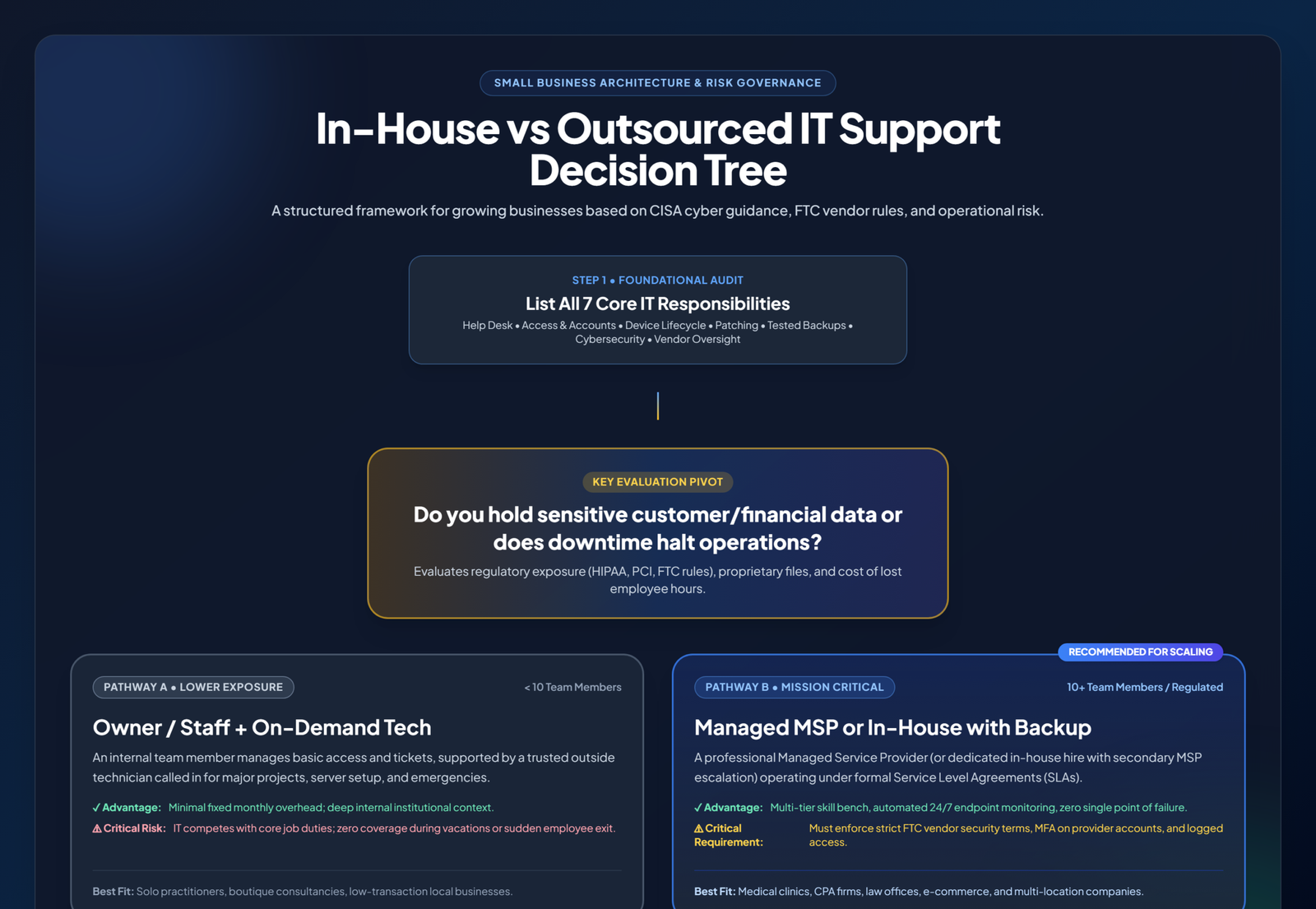
Small Business IT Support Decision Framework
To evaluate which pathway matches your company’s profile, follow this practical decision architecture based on regulatory risk, headcount, and uptime dependency:
What Does an In-House IT Person Really Cost?
When leadership compares hiring an internal employee against paying an outside managed firm, they frequently make the mistake of comparing an outside monthly fee to an employee’s base salary alone.
According to the latest data from the U.S. Bureau of Labor Statistics (BLS Occupational Outlook Handbook):
- Computer User Support Specialists (Help Desk Tier 1/2): Reported a national median annual wage of $61,860.
- Network and Computer Systems Administrators (SysAdmin / Tier 3): Reported a national median annual wage of $99,130.
Crucially, base salary represents only a portion of the true employment burden. A realistic financial model must factor in:
| Cost Category | Typical Expense Formula / Factor | Estimated Annual Impact (Per Hire) |
|---|---|---|
| Base Salary | BLS National Median (User Support vs SysAdmin) | $61,860 – $99,130 |
| Payroll Taxes & Mandatory Benefits | FICA, FUTA, Oregon state taxes, workers’ compensation | $6,200 – $10,500 |
| Healthcare, 401(k) & Benefits | Employer health contribution, retirement match, PTO accruals | $9,000 – $16,000 |
| IT Management Software & Tooling | RMM software, ticketing portal, endpoint protection, backup licenses | $4,500 – $9,000 |
| Training, Certifications & Hardware | CompTIA, Microsoft, Cisco, testing gear, lab environment | $3,000 – $6,000 |
| Total True Cost of In-House IT | Fully burdened labor rate (1.35x – 1.45x multiplier) | $84,560 – $140,630 / year |
Furthermore, capital cost alone does not resolve the skills mismatch. A help desk technician skilled at diagnosing Outlook synchronization or Wi-Fi drops is rarely qualified to architect an immutable cloud backup cluster or conduct zero-trust firewall audits. Hiring in-house forces a small business to gamble that one individual covers the entire spectrum from entry-level hardware support to advanced cyber defense.

What Does Outsourcing Really Cost and What Are the Risks?
Because managed IT pricing varies substantially by region, compliance posture, and included toolsets, reliable neutral indexes do not publish a single standard rate. However, providers universally bill small businesses across three commercial structures:
- Flat Monthly Fee per User or per Device: The most prevalent model. A fixed monthly price covers unlimited help desk tickets, automated endpoint patching, antivirus/EDR licenses, and backup monitoring for a defined scope of machines.
- Hourly or Block-of-Time Billing: The business purchases a block of hours (e.g., 20 or 50 hours) used on-demand for troubleshooting and projects. While low-commitment, this model incentivizes reactive break-fix behavior rather than proactive maintenance.
- Hybrid Co-Managed Fee: A low base retainment fee covers core security tooling and automated maintenance, while hands-on labor or specialized infrastructure migrations are billed at contracted hourly rates.
The Critical Security Caveat: Handing over technical operations to an outside provider introduces serious supply chain risk. Your IT partner will possess domain administrative credentials, root-level access to executive email, customer databases, and financial repositories. The FTC explicitly instructs small businesses to treat technology providers as top-tier vendors: “Put security provisions in vendor contracts and verify compliance; do not simply take a vendor’s word for it.”
The Federal Security Baseline Any Setup Must Meet
Whether you choose an internal hire, an external partner, or a hybrid arrangement, federal cyber defense authorities enforce the exact same standard baseline. As codified in CISA’s official Cyber Guidance for Small Businesses and the FTC’s Cybersecurity for Small Business framework:
| Security Control | Official Federal Guidance & Requirements | Authoritative Source |
|---|---|---|
| Multi-Factor Authentication (MFA) | Enforce phishing-resistant MFA across all administrative and user logins without exception; require MFA for all third-party vendor connections. | CISA, FTC |
| Prompt Vulnerability Patching | Prioritize fixes listed in CISA’s Known Exploited Vulnerabilities (KEV) Catalog; configure automatic updates for OS, browsers, and productivity suites. | CISA, FTC |
| Tested Off-Network Backups | Maintain air-gapped or immutable off-network backups; conduct scheduled, verified test restores of both individual files and full server images. | CISA, FTC |
| Least-Privilege Admin Rights | Revoke local administrator rights from all day-to-day user laptops to prevent unauthorized software installation and malware escalation. | CISA |
| Full Disk Encryption | Enable native disk encryption (BitLocker on Windows, FileVault on macOS) across all company laptops and mobile endpoints. | CISA |
| Written Vendor Security Terms | Establish legally binding security standards in vendor contracts, mandate strict account segregation, and verify compliance regularly. | FTC |
As CISA emphasizes in its official leadership guidance: “Building a security culture cannot be delegated.” Even if you outsource 100% of your hands-on technical execution to an external provider, a named internal stakeholder within your business must maintain executive ownership of access controls, data boundaries, and the incident response playbook.
Questions to Ask an IT Provider Before Signing
Before entering a monthly managed agreement, interview prospective IT providers using these diagnostic criteria:
| What to Ask the Vendor | What a Professional Answer Looks Like | Red Flags & Warning Signs |
|---|---|---|
| What is included in the base fee, and what costs extra? | Provides a granular, itemized written scope matrix and an hourly rate sheet for out-of-scope work. | “Don’t worry, we take care of everything” with zero written documentation. |
| What are your guaranteed response & resolution SLAs? | Written response time targets (e.g., 15-minute emergency triage, 2-hour general ticket) backed by financial credits. | Vague promises like “we answer as fast as we can” without contractual remedies. |
| How do you protect the admin access you hold to our systems? | Mandatory hardware MFA on technician logins, individual named accounts, role-based privileges, and session audit logs. | Shared master passwords, generic administrator accounts, or absence of login logs. |
| How are our backups verified, and when was the last test restore? | Automated daily integrity reports and scheduled quarterly test restoration drill logs you can independently inspect. | “The green checkmark is on, so backups are working fine” without verified restores. |
| Who owns our domain, cloud tenant, and data accounts? | Your business owns all master tenant accounts with global admin access; the provider operates as a delegated partner. | Accounts or software licenses registered in the IT provider’s company name. |
| What happens if we decide to part ways? | Documented offboarding timeline, complete handover of credential vaults and network diagrams, and standard 30-day notice. | Multi-year mandatory lock-in clauses, steep transition fees, or withholding passwords. |
Frequently Asked Questions
Is outsourced IT support cheaper than hiring an internal employee?
In almost all businesses under 40 employees, yes. An in-house hire represents a fixed overhead of $85,000 to $140,000+ per year when factoring in benefits, payroll taxes, licensing, and management. By comparison, outsourced managed IT allows small businesses to purchase a shared bench of advanced engineers at a fraction of a single full-time salary while eliminating vacation gaps.
Do I still need someone inside the company if we outsource IT?
Yes. CISA explicit guidance states that security culture and organizational risk cannot be abdicated to a third party. An internal coordinator (such as an office manager, COO, or managing partner) must act as the primary liaison to approve access requests, prioritize budgets, verify backup reports, and ensure compliance with company policy.
What security control should a small business fix first?
Multi-Factor Authentication (MFA) across all email (Microsoft 365 / Google Workspace) and remote access logins. CISA notes that MFA blocks up to 99% of automated credential stuffing attacks. The second immediate priority is running a scheduled test restore from off-network backups.
Can an IT provider become a cybersecurity risk?
Yes. Managed Service Providers are frequent targets for advanced ransomware syndicates because compromising one MSP can grant attackers access to hundreds of client networks. Always verify that your provider enforces hardware MFA for its technicians, adheres to strict account isolation, and signs binding data security agreements conforming to FTC standards.
What to Do This Month: 5-Step Action Checklist
- Map All 7 Functional IT Jobs: Review the functional areas table and write an assigned name next to help desk, account provisioning, device lifecycle, patch management, backup verification, cybersecurity, and vendor management.
- Audit MFA Enforcement: Verify that Multi-Factor Authentication is actively enforced for all email, VPN, accounting software, and administrator accounts.
- Execute a Live Backup Restoration Test: Request that whoever manages your backups demonstrates a successful live file restore from off-network storage.
- Review Existing Technology Contracts: Inspect your provider agreements for response time SLAs, account ownership clarity, and clean 30-day exit clauses.
- Designate Internal Executive Ownership: Formally designate one internal executive or operations leader to own technology governance and vendor accountability.
Need Resilient, Enterprise-Grade IT Support?
Enter and Post LLC provides Pacific Northwest businesses with dedicated IT systems management, CISA-aligned cybersecurity, certified cloud administration, and virtual staffing support—without bloated salaries or lock-in contracts.