
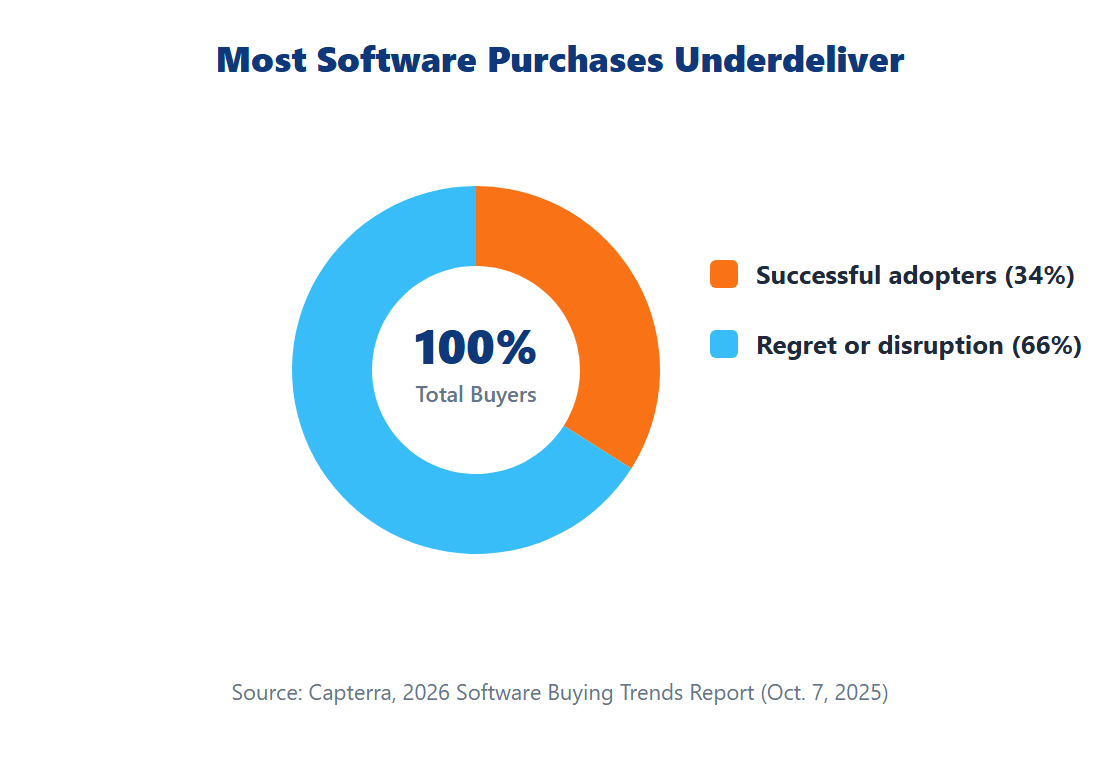
Only 34% of software buyers count as “successful adopters” with a smooth buying and implementation process (Capterra, 2026 Software Buying Trends Report, Oct. 7, 2025). The other 66% hit some form of regret or disruption — and 89% of buyers who regret a purchase say it came from an unexpected implementation problem, not from picking the wrong tool outright.
That’s the real lesson behind most “best small business software” roundups: the tool usually isn’t the problem. The evaluation process is. This guide gives you a framework for choosing software by category and need, not a generic list of top picks.
Key Takeaways
- Only 34% of software buyers are “successful adopters”; 89% of buyers who regret a purchase hit an unexpected implementation disruption (Capterra, 2026)
- Small and midsize business AI tool use jumped from 48% to 77% between July 2024 and 2026 (Intuit QuickBooks)
- 86% of businesses that paid for AI software in 2024 were still paying a year later — AI features are sticky, not a short-lived trial gimmick
- Evaluate by category and real need first, not by a “best tools” list — most tool sprawl comes from solving the same problem twice with different apps
Why Most Software Purchases Underdeliver
The gap between successful and regretful software buyers isn’t about picking a worse product — it’s about process. Capterra’s 2026 research, based on a survey of more than 3,300 global software buyers, found that successful adopters typically finalize a purchase within three months and go in with an implementation plan already in place. Buyers who skip that planning step are the ones most likely to hit the kind of unexpected disruption that drives regret.
That finding reframes the whole buying decision. Instead of asking “what’s the best CRM,” the more useful question is “what problem am I actually solving, and do I have a plan to roll this out.” A mediocre tool with a real implementation plan tends to outperform a great tool bought on impulse.

The Core Software Categories Every Small Business Considers
Most small businesses eventually evaluate software in a handful of recurring categories, even if they don’t need all of them at once:
- Accounting software — tracks income, expenses, and tax-relevant records; the foundation most other tools eventually connect to, and the starting point covered in our bookkeeping fundamentals guide
- CRM (customer relationship management) — tracks leads, customers, and communication history as a business grows past the point of remembering every relationship personally
- POS (point of sale) — processes in-person payments and inventory for retail, food service, and similar businesses
- Scheduling and booking — manages appointments, staff shifts, or reservations for service-based businesses, including payroll-adjacent tools once you have employees to schedule (see our Portland payroll tax guide for what that triggers)
Adoption varies a lot by business size and category, and much of the data circulating online about exact adoption percentages traces back to industry estimates rather than a single disclosed survey — so treat specific adoption numbers you see elsewhere with some skepticism. What’s well-documented qualitatively is that smaller, newer businesses tend to adopt these categories later and more selectively than larger or more established ones, often starting with accounting software and adding CRM or POS only once volume demands it.
Consider a five-person landscaping company and a two-location bakery as contrasting examples. The landscaping company likely needs scheduling software to manage crews and job sites well before it needs a CRM — its “customers” are a manageable list the owner already knows by name. The bakery, by contrast, probably needs POS software from day one to run its registers, and a CRM only becomes worthwhile once it starts tracking catering clients or a loyalty program separately from walk-in sales. The right starting category isn’t universal; it follows from what actually creates friction in the business today, not from a generic “every small business needs X” list.
AI Features Are Now the Default, Not an Add-On
Small and midsize business AI tool use jumped from 48% in July 2024 to 77% in 2026 (Intuit QuickBooks, 2026 AI Impact Report, May 12, 2026), based on a survey of more than 34,000 small and midsize business owners plus anonymized data from 5.3 million QuickBooks businesses, conducted with University of Chicago economists. The same report found 78% of AI users say it improved productivity and 43% say it increased revenue, with only 2% reporting a negative effect.
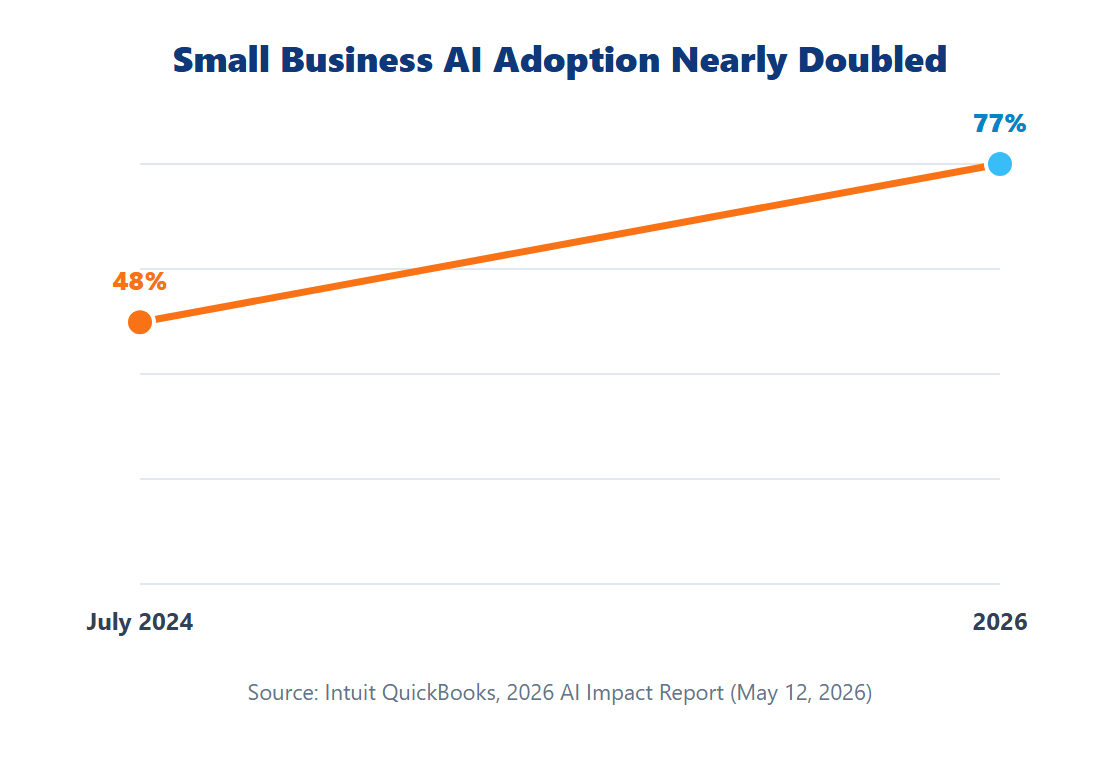
These features are proving sticky, not a short-lived novelty: 86% of businesses that paid for AI tools in 2024 were still paying for them in 2025. In practice, this means evaluating a tool’s built-in AI features is no longer optional due diligence — it’s close to the default expectation, and a tool with no AI roadmap is increasingly the exception rather than the norm.
A Framework for Evaluating Any Software Purchase
Borrowing from what separates successful adopters from everyone else, a practical evaluation framework looks like this:
- Name the specific problem first. Not “we need better software,” but “we lose track of which customers we’ve followed up with.”
- Trial or pilot before committing. Run the tool with real data for a limited group or time period before a company-wide rollout.
- Write a one-page implementation plan. Who migrates the data, who trains the team, and what the cutover date is — before you sign, not after.
- Set a decision deadline. Successful buyers in Capterra’s research typically closed their decision within three months; open-ended evaluations tend to drift and lose momentum.
- Ask directly about AI features and their cost. Given how fast AI adoption has moved, confirm what’s included in your tier versus what requires an upsell.

Most owners skip step three — the written implementation plan — because it feels like unnecessary paperwork for a small purchase. In practice, it’s the single cheapest step in the whole process: a half-page document naming who migrates existing data, who trains the rest of the team, and what date the old tool gets switched off. Skipping it doesn’t save time; it just moves the planning into the middle of the rollout, when problems are more expensive to fix and harder to walk back.
Avoiding Tool Sprawl
Many small business owners report accumulating a handful of overlapping tools over time — a scheduling app, a separate invoicing tool, a CRM that duplicates contact data already sitting in the accounting software — without a single deliberate decision to add complexity. There isn’t a single authoritative number on exactly how many tools the average small business juggles, so treat any precise figure you see elsewhere cautiously, but the pattern itself is widely reported by small business owners and advisors alike.
The practical fix is the same evaluation discipline from the framework above, applied retroactively: before adding a new tool, check whether an existing one already covers the need, even partially. Consolidating two overlapping tools into one that handles both jobs usually beats adding a third.
A simple audit exercise helps here: list every paid software tool your business uses, what it costs per month, and who on your team actually logs in regularly. Tools with low login activity relative to their cost are the clearest consolidation candidates — not necessarily because the tool is bad, but because it’s not earning its place in the stack. Revisit this list roughly twice a year; tool sprawl rarely happens all at once, so catching it requires a recurring check rather than a one-time cleanup.

Portland’s Small Business Tech Support Resources
Portland has the largest share of employees working for small businesses among peer U.S. cities, at 28% — above the national average (City of Portland Bureau of Planning and Sustainability, April 2025). The city has backed that reality with direct support: in 2025, Portland’s Bureau of Planning and Sustainability awarded $155,000 in Digital Navigator and Digital Transformation grants to organizations including Micro Enterprise Services of Oregon (MESO), which helps small businesses adopt tools like QuickBooks and e-commerce platforms.
If you’re early in evaluating software and want hands-on help rather than doing it alone, a local digital navigator program is worth checking before you default to a generic online buying guide. If a new website is also on your list alongside internal software, see our guide to hiring a web developer in Portland for the same cost-and-evaluation framing applied to that decision.
Frequently Asked Questions
Do I need separate tools for accounting, CRM, and POS, or an all-in-one platform?
It depends on how well an all-in-one platform covers each function compared to a dedicated tool. A good rule of thumb: if a bundled feature would be your primary tool for that function, it’s worth it; if you’d end up using it as a weaker backup to a separate best-in-class tool, you’re likely better off keeping them separate and integrating.
Is AI worth paying extra for in small business software?
Based on the data, it increasingly looks that way: 78% of small business AI users report a productivity improvement and 43% report a revenue increase, with persistence data showing 86% of businesses that adopted AI tools in 2024 kept paying for them a year later. Evaluate the specific AI features against your actual workflow rather than assuming all AI add-ons are equally useful.
How long should evaluating new software take?
Capterra’s research found that successful adopters typically finalize a decision within about three months of starting the process. Longer evaluations aren’t inherently wrong, but an open-ended search without a deadline is correlated with worse outcomes.
What’s the biggest reason software purchases fail?
Implementation disruption, not tool choice. 89% of buyers who regretted a software purchase hit an unexpected implementation problem — a reason to prioritize a clear rollout plan over additional feature comparison once you’ve narrowed your options.
Conclusion
The single biggest lever for a successful software purchase isn’t finding the “best” tool — it’s naming your actual problem, trialing before committing, and having an implementation plan ready before you sign. AI features have moved from a nice-to-have to close to a default expectation, and they’re proving sticky enough to budget for seriously rather than treat as a trial gimmick.
If you’re building out your business’s financial tooling as part of this process, our guides to bookkeeping fundamentals and Portland’s small business tax stack cover what your accounting software needs to support from day one.
Looking to Streamline Your Business Operations & Software Stack?
Enter and Post LLC provides integrated software automation, bookkeeping, payroll, and cloud systems implementation for growing businesses in Portland, Oregon and nationwide.