Almost every software vendor now says its product is an “AI agent.” For a small business owner, that word is hard to pin down. Is it a chatbot with a new name? A scheduling tool? Something that can run part of your business while you sleep?
You aren’t alone in wondering. The U.S. Census Bureau’s Business Trends and Outlook Survey found that between 17% and 20% of U.S. businesses reported using AI from December 2025 to May 2026, with 19.8% on May 3, 2026 (U.S. Census Bureau, May 26, 2026). The same report noted that AI use among firms with fewer than 20 employees did not change significantly over that period. Most small businesses are still deciding, and that makes clear definitions worth having.
This guide explains what an AI agent is, where one can help a small business, where it can go wrong, and what to ask before you pay for one. It is general information, not legal or financial advice.
Key Takeaways
- An AI agent decides its own steps and uses tools to get a task done. A workflow follows steps you fixed in advance. A chatbot mostly answers questions.
- Start with the simplest tool that works. Anthropic’s engineering guidance says agentic systems often trade latency and cost for better task performance, so the extra autonomy has to earn its place.
- Pick one repeatable, low-risk task: keep a person approving anything customers see or money moves on, and expand only after it works.
- You stay legally responsible for what your agent says. The FTC has explicitly affirmed that there is no “AI exemption” from existing consumer protection laws.
- This guide quotes no pricing or return-on-investment figures, because neutral, empirical sources do not exist for them.
In this article:
- • What is an AI agent, in plain terms?
- • Do you need an agent, or something simpler?
- • Where AI agents can help a small business
- • Where AI agents go wrong (and how they fail)
- • You are responsible for what your agent says
- • How to try an agent without betting the business
- • Questions to ask any vendor or agency
- • Frequently asked questions
- • Working with Enter and Post LLC
What is an AI agent, in plain terms?
An AI agent is software that uses a language model to decide, step by step, how to finish a task and which tools to use along the way. Anthropic’s engineering team draws the line this way: workflows are systems where language models and tools are orchestrated through predefined code paths, while agents are systems where the model dynamically directs its own process and tool use (Anthropic, Building effective agents, December 19, 2024).
In everyday terms:
- A chatbot answers questions in a conversation. It usually doesn’t act on anything outside the chat window.
- A workflow (often called automation) does the same steps every time. When a form is submitted, copy the details to a spreadsheet, send a confirmation email, and notify the owner. You chose the steps.
- An agent gets a goal, such as “find a time that works for these three people and book it,” and works out the steps itself. It might check calendars, send a message, wait for a reply, and try again.
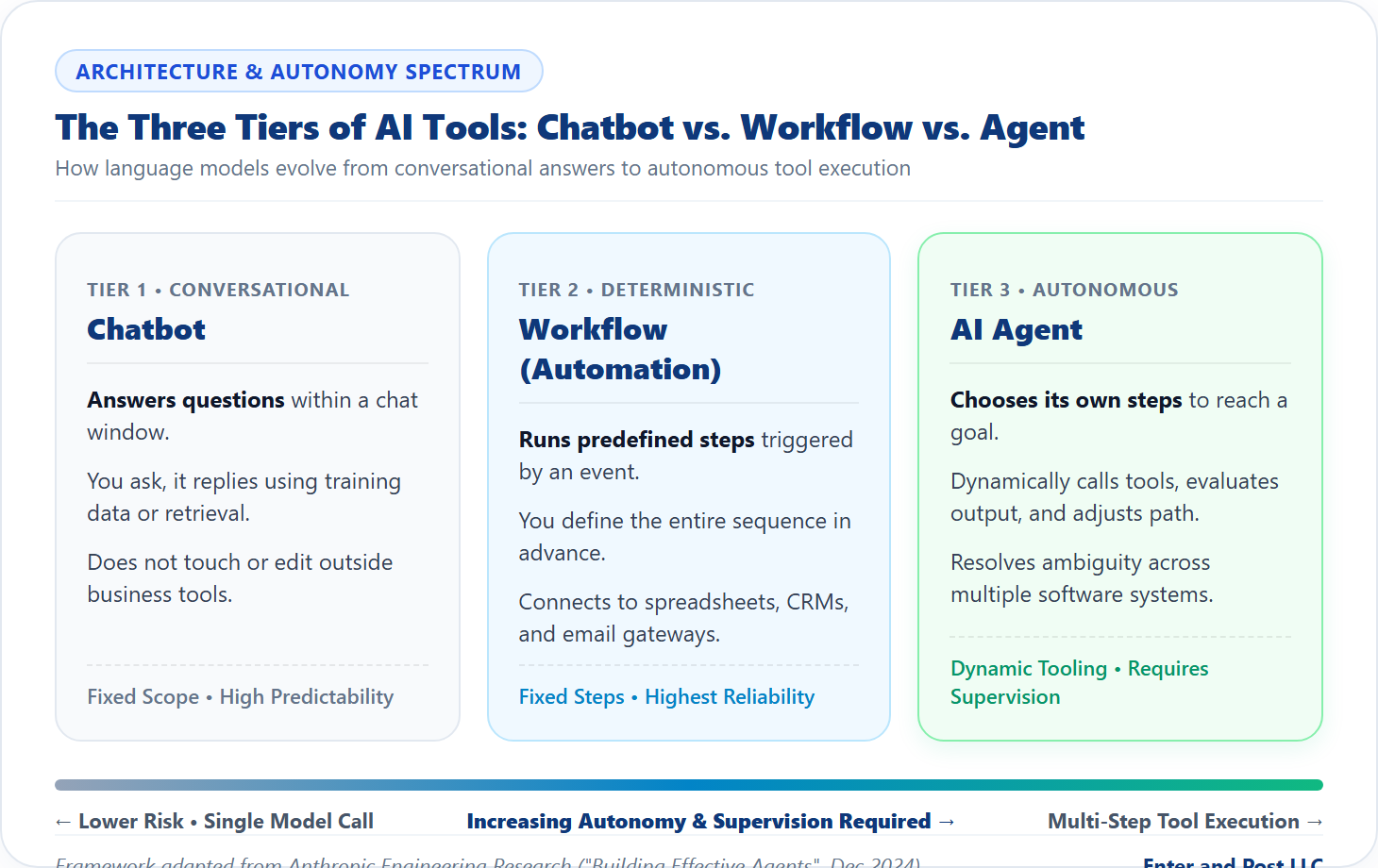
Be careful with labels. The word “agent” is used loosely, and some products sold as agents are closer to workflows or chatbots. That isn’t necessarily bad. A fixed workflow can be the better choice, and the next section explains why.
Do you need an agent, or something simpler?
Often you don’t. Anthropic recommends starting with the simplest solution and adding complexity only when needed. It says workflows suit well-defined tasks where predictability matters, and agents suit cases where flexibility and model-driven decisions are needed. It also notes that for many applications, optimizing a single model call with retrieval and examples is enough.
A quick comparison:
| Feature | Chatbot | Workflow (automation) | AI Agent |
|---|---|---|---|
| What it does | Answers questions | Runs the same steps every time | Picks its own steps toward a goal |
| Predictability | High | Highest | Lower (varies by task) |
| Needs tool access? | Rarely | Yes, to connected systems | Yes, to multiple dynamic APIs |
| Setup effort | Low | Medium | Medium to high |
| Best for | FAQs, simple customer support | Repetitive, structured operations | Complex tasks needing judgment |
| Main risk | Hallucinations / wrong answers | Breaks when inputs change | Wrong actions, not just wrong words |
If your task is “every new lead gets the same email and a row in a spreadsheet,” that is a workflow. If it is “read incoming requests, work out what each customer needs, and reply or route it,” an agent might help, as long as someone checks the results. Our guide to choosing business software covers how to evaluate automation tools before you buy.
Where AI agents can help a small business
These are examples of tasks agents are commonly pitched for. Whether one pays off depends on your volume, your systems, and how much supervision it requires:
- Inbox triage: Sorting incoming email, flagging urgent messages, and drafting replies for you to approve.
- Scheduling: Finding times across calendars, sending invitations, and handling reschedules.
- Lead follow-up: Noticing a new inquiry, drafting a contextual response, and logging it in your CRM.
- First-draft documents: Quotes, proposals, and routine letters that a person reviews before sending.
- Bookkeeping preparation: Sorting receipts and flagging unusual entries for your accountant. A person still decides what gets recorded. (See our bookkeeping fundamentals guide for records that must stay close to you.)
- Internal questions: Searching your company knowledge base so staff can find policies or SOPs faster.

Notice the pattern. In every example, the agent prepares work and a person approves the part that matters. That human-in-the-loop arrangement is the safest way to begin.
Where AI agents go wrong (and how they fail)
Agents can fail in ways a fixed workflow cannot, because they make autonomous choices:
- They can be wrong with confidence: A language model can produce a fluent answer that is completely false. In Moffatt v. Air Canada (decided February 14, 2024), a British Columbia tribunal held the airline liable after its website chatbot gave a customer inaccurate bereavement fare information, firmly rejecting the defense that the chatbot was a separate legal entity.
- They can be tricked (Prompt Injection): OWASP, the security authority that publishes the Top 10 risks for language-model applications, identifies prompt injection (LLM01) as a premier threat where untrusted text alters the model’s behavior. An email or uploaded invoice read by your agent could contain hidden instructions commanding it to forward files or approve payments.
- They cost more than one answer: Anthropic notes that agentic systems often trade latency and cost for better task performance. Several model calls per task add up, and a slow agent can frustrate customers waiting on a response.
- They can take unintended actions: An agent with access to your email, calendar, and accounts can delete, alter, or send messages prematurely. Always enforce the principle of least privilege.
You are responsible for what your agent says
Using AI does not transfer legal responsibility to software vendors. When the Federal Trade Commission (FTC) announced Operation AI Comply on September 25, 2024, targeting deceptive AI schemes and fake reviews, the FTC Chair made it clear: “There is no AI exemption from the laws on the books.”
This principle applies directly to everyday business operations:
- What you claim about your AI: Do not advertise that your system can do something it cannot.
- What your agent tells customers: Treat statements about prices, warranties, and cancellation terms exactly like statements made by a human employee. If it creates a binding obligation, a human must supervise it.
How to try an agent without betting the business
If you want to pilot an AI agent in your company, follow this 7-step checklist:
- Choose one task: It should be repeated often, well understood, and low-risk if it fails.
- Write down what good looks like: A one-paragraph rubric describing the correct result so you can audit the agent’s output.
- Keep a person in the loop: The agent drafts; you approve anything customers see or anything involving money or private customer data.
- Limit system access: Grant only the specific accounts and permissions the task needs, using separate API keys or logins.
- Run it alongside your current process: Compare its results with what you would have done manually for several weeks.
- Log every action: Ensure you can see what steps the agent took, why it took them, and how to shut it off instantly.
- Expand slowly: Add a second workflow only after the first one proves reliable over time.
Questions to ask any vendor or agency
Whether you are buying off-the-shelf software or hiring an agency to build a custom agent, ask these diagnostic questions:
- What does “agent” mean in your product? Does it dynamically choose steps, or follow a hardcoded Zapier-style workflow?
- What can it access and change? Request an itemized list of systems, database permissions, and write-privileges.
- What can it do without human approval? Sending emails, issuing refunds, and altering records require strict guardrails.
- How are mistakes caught and recorded? Ask to see an audit log interface.
- Where does customer data go? Confirm where data is stored and ensure it is not used to train public third-party models.
- How do I turn it off? Ensure there is a single-click emergency kill-switch.
- What does it cost to run? Ask about token usage, API calls, and hosting overhead beyond the base subscription.
Frequently asked questions
Is an AI agent the same as a chatbot?
No. A chatbot answers questions inside a chat interface. An AI agent is given an objective and dynamically calls tools (like calendars, email, or databases) to take autonomous actions across software.
Will an AI agent replace my staff?
Not for most small businesses. The most effective deployments use AI agents to handle routine research, inbox sorting, and first drafts, freeing human staff to focus on customer relationships and high-judgment decisions.
How much does an AI agent cost?
Pricing varies dramatically based on whether you use SaaS subscription agents or custom API-driven workflows. Always ask for setup fees, ongoing monthly costs, and variable model token charges in writing.
Are AI agents safe to connect to my business accounts?
They are safe only when configured with strict permissions (least privilege) and human-in-the-loop review on critical actions. Without guardrails, agents can fall prey to prompt injection or hallucinated actions.
Working with Enter and Post LLC
At Enter and Post LLC, we build practical, secure automation architectures for small businesses in the Pacific Northwest and nationwide. Whether you need custom AI edge-workers, seamless QuickBooks integrations, or human-backed bookkeeping from $99/month, we help you eliminate operational drag while keeping you 100% in control.